

🔴 TESSY Test System
Automated Testing of Embedded Software
TESSY automates unit and integration testing of embedded C/C++ software on a wide range of target systems. It supports the complete testing workflow — from project setup and test design through test execution to result analysis and reporting.
Integrated requirements management, code coverage analysis and traceability help development teams organize, execute and document software tests systematically and reproducibly.
The following figure provides an overview of TESSY's core features.

Manage Your Test Project
TESSY provides integrated test project management for organizing tests in individual project structures using collections and folders. Environment variables and compiler/debugger configurations can be managed with the integrated Test Environment Editor.
Test and coverage results are stored in dedicated test runs, allowing previous results to be retained for reporting while test cases and test data continue to evolve.
Define, Link and Trace Requirements
TESSY provides integrated requirements management and can also import requirements from external requirements management systems. Test cases can be linked directly to requirements, enabling requirements coverage, traceability and impact analysis when requirements change.
Requirements and validation results can be exchanged using supported formats and integrations, allowing TESSY to fit into existing development and quality-assurance workflows.
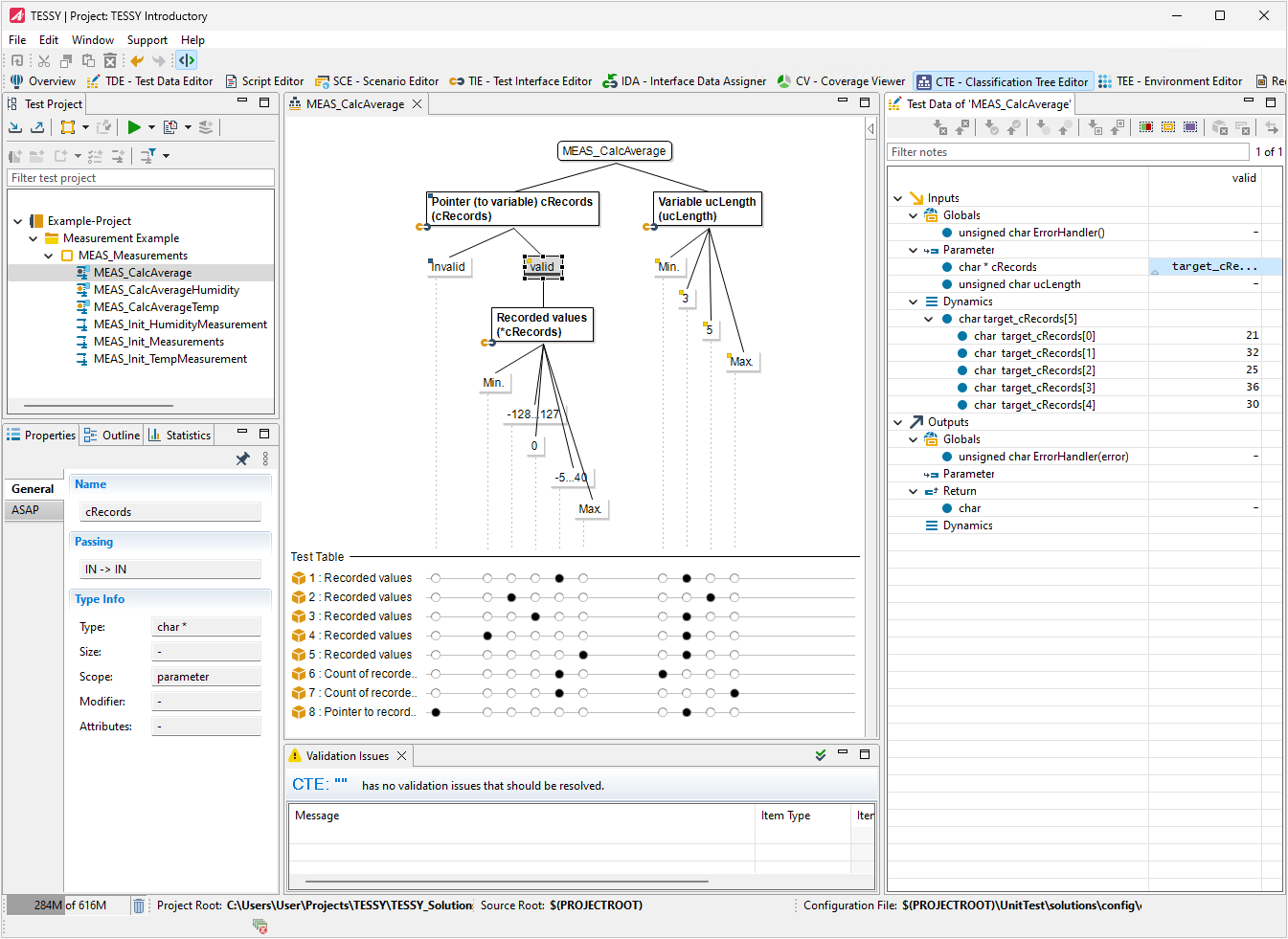
Design Test Cases Within the Classification Tree Editor (CTE)
The Classification Tree Editor provides a graphical method for systematic test design based on the Classification Tree Method (CTM). It helps transform functional specifications into structured test cases while reducing unnecessary redundancy.
Because CTE is integrated into TESSY, test data and expected results can be transferred directly into the TESSY testing workflow.
Edit Test Data Within the Tabular Test Data Editor (TDE)
With the help of the Test Data Editor (TDE) the editing of test data is simplified. Additionally the test data are visualized within plots.

Add Additional Code
The User Code Editor is an integral part of the TDE perspective and provides flexible editing and outline views together with the tabular test data viewer, e.g. you have the possibility to read/write registers or add individual stub code.
Test Software Variants
TESSY supports efficient testing of software variants using hierarchical variant structures. Base and derived variants can share test cases while allowing variant-specific test data and configurations where required.
Changes to a base variant can be synchronized with derived variants, helping development teams systematically test product families and software configurations without unnecessarily duplicating test definitions.
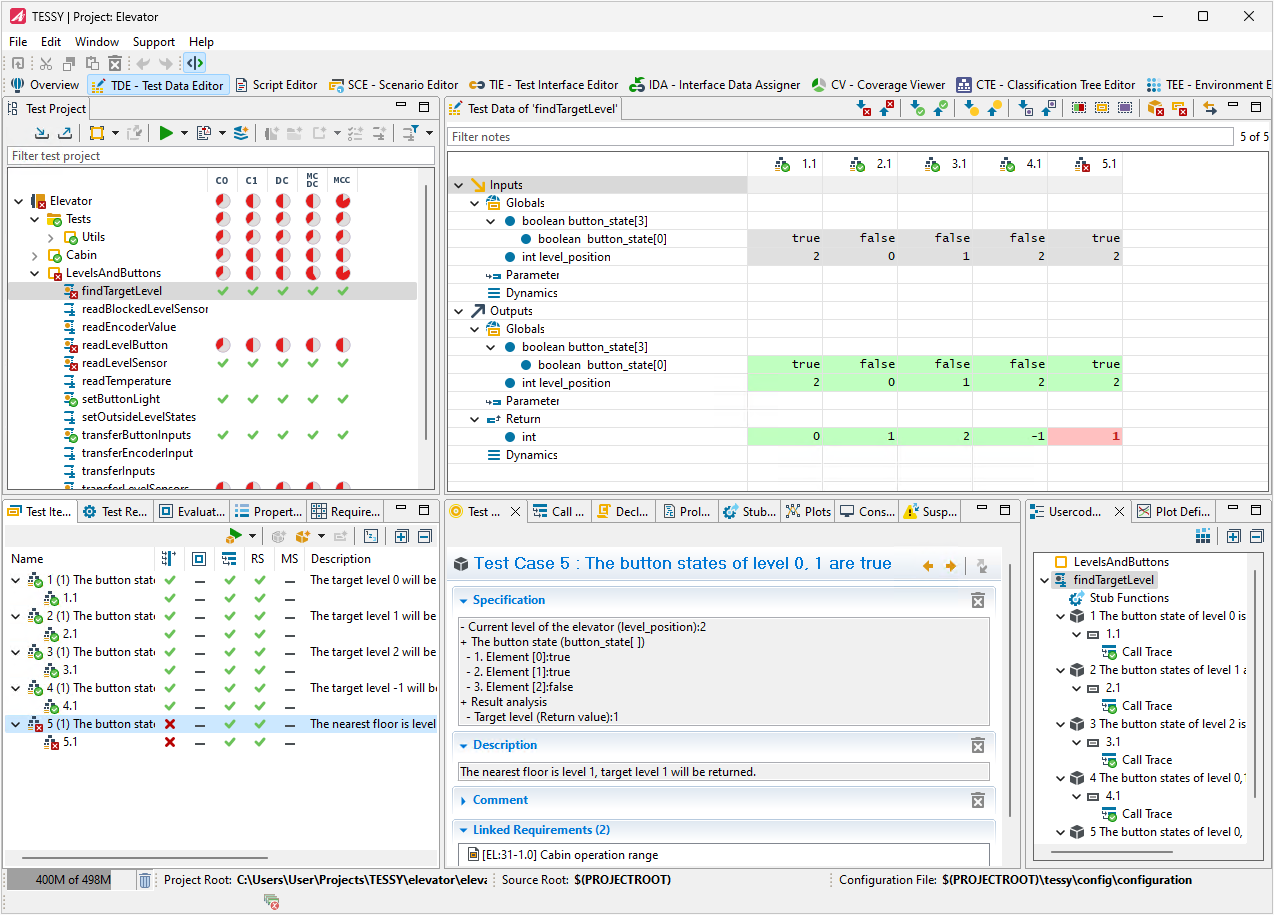
Analyze the Test Results
Colored values within the TDE which correspond to the state of the test results, the visualization of test results within plots, and the Coverage Viewer (CV) with the function flow and details about the coverage help to analyze the test results.
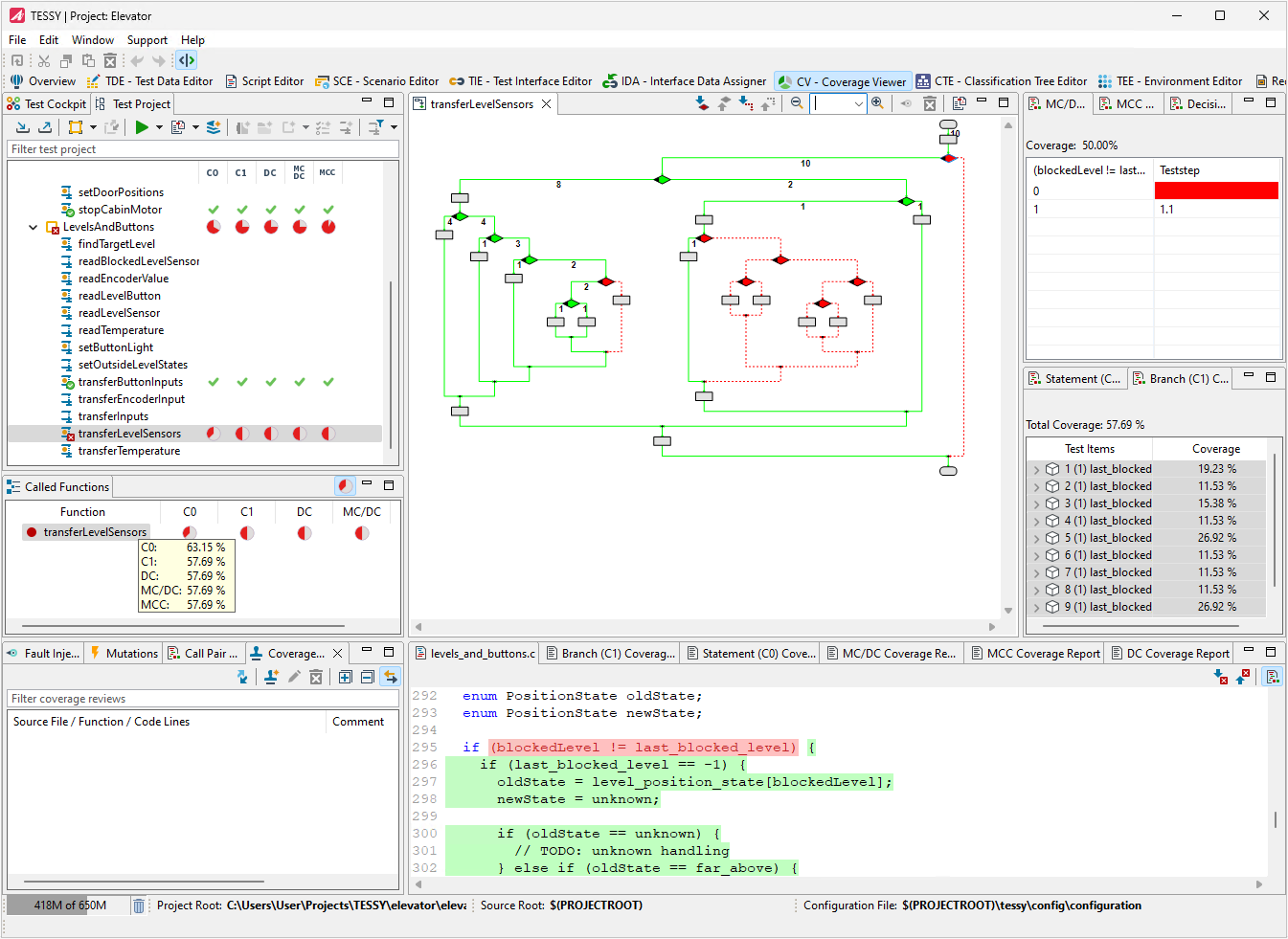
Analyze Code Coverage
To determine what proportion of your project's code is actually being tested by unit tests or integration tests, you can use the code coverage feature of TESSY. There are different kinds of coverage measurements which are provided in TESSY:
- Statement Coverage (C0)
- Branch Coverage (C1)
- Decision Coverage (DC)
- Modified Condition / Decision Coverage (MC/DC)
- Multiple Condition Coverage (MCC)
- Entry Point Coverage (EPC)
- Function Coverage (FC)
- Call Pair Coverage (CPC)
Code coverage can optionally be enabled when running tests, which causes TESSY to automatically instrument the source code for the selected coverage measurements. The Coverage Viewer shows the percentage of the code that was run in the test. In addition, the flow chart view and the colored source code view shows you graphically which code has been tested. Coverage results help identify code that has not yet been exercised by the existing tests and support the evaluation of test completeness according to project and process requirements.
Call Pair Coverage
An important feature in TESSY is the Call Pair Coverage (CPC) measurement, which checks whether all call points of functions or methods within the test object have been executed at least once. This meets the requirements of ISO 26262 for safety-relevant software development as an alternative code coverage procedure for integration tests instead of function coverage (FC) measurement.
Hyper Coverage
The Hyper Coverage (HP) provides a way to easily reveal code parts not being tested by any of the existing tests by investigating the current weaknesses of code coverage. This works without any additional efforts for the tester. The key of this feature is the automated detection of hidden code within the source files and the accumulation of standard code coverage measurements into the Hyper Coverage. As a side effect of the implementation of this novel capability, the need for retesting due to minor software adjustments can also be streamlined. This ensures that solely the impacted components necessitate reevaluation.
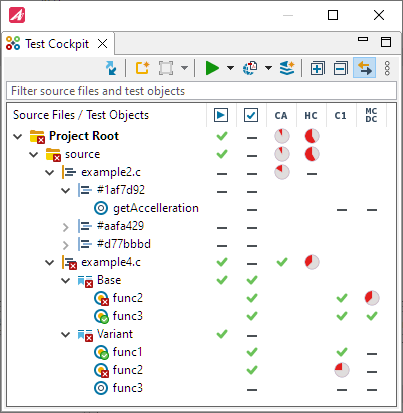
The Code Access Analysis is already available after creation and analysis of modules. Testers have a quick overview after test set up if there are any untested parts of the source code.
The Test Cockpit view summarizes all results and coverages for all test objects within the source files.
The following videos explain the Code Access and Hyper Coverage features as the most innovative TESSY features in
depth:
Code Access Feature in TESSY
Hyper Coverage Feature in TESSY
Hyper Coverage with Variants Feature in TESSY
Coverage Review
Source code lines can be marked with predefined as well arbitrary comments. This ensures a better documentation of
unreached code lines found by Code Access (CA) and Hyper Coverage (HC).
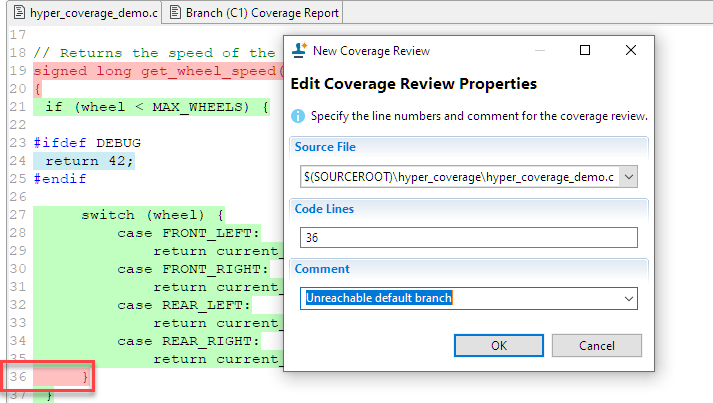
Using this feature provides the possibility to reach full coverage as reviewed source code lines will be considered in the Code Access (CA) and Hyper Coverage (HC) measurement.
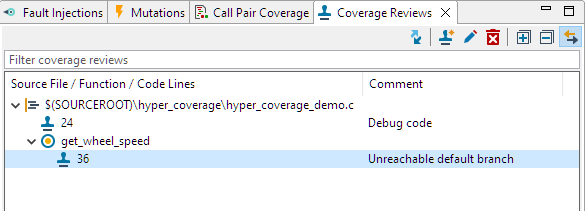
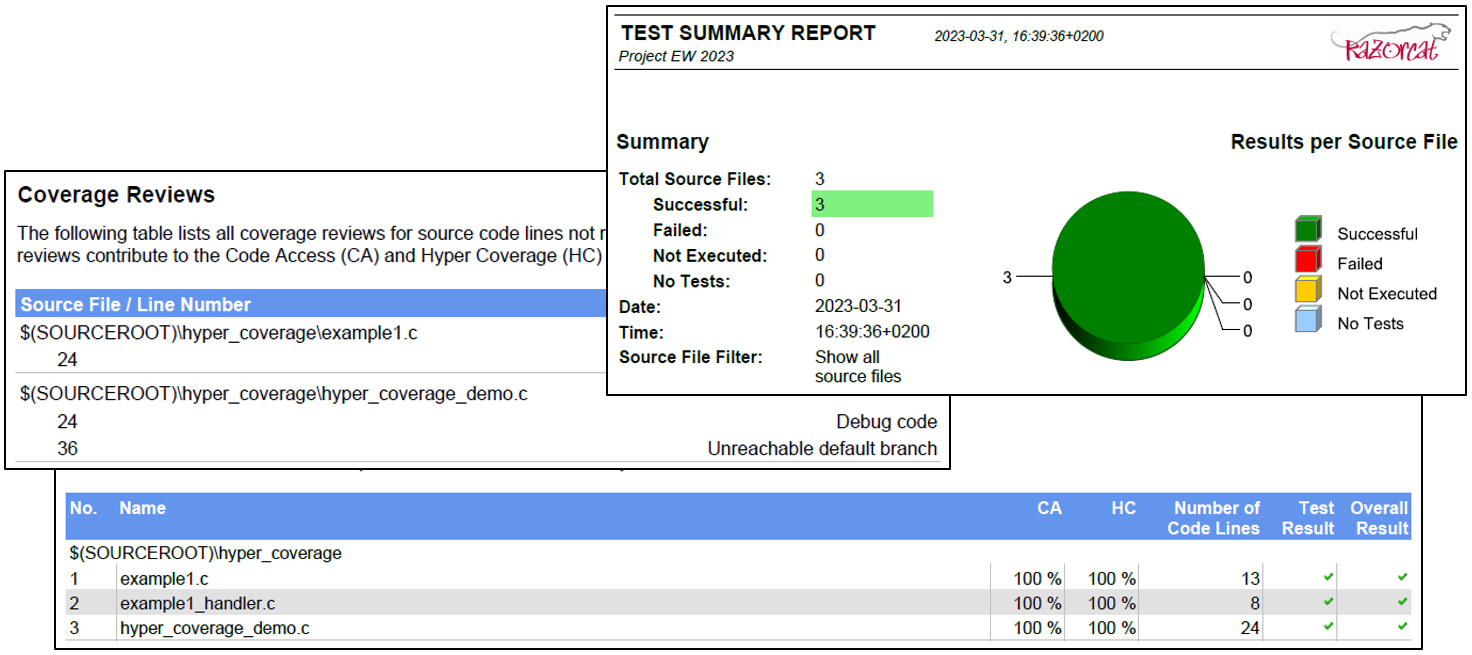
The Coverage Review view lists the reviews for each source file. All coverage reviews will be documented within the test summary report.
Test Your Components
Define scenarios in the Scenario Editor (SCE) and test components. All variables of the component interface may be set and checked at arbitrary points in time within the scenario.
Report the Test Plan and the Test Results
TESSY offers different types of automatically created and well-designed test reports in PDF. These reports summarize the test execution coverage and test summary of the current test project status, initially as an overview and finally regarding the test details. This way, you can create reports that e.g. map your requirements, the V&V matrix and the test planning coverage (=planned requirements coverage).
Download TESSY

TESSY is qualified for safety-related software development according to
IEC 61508, IEC 62304, ISO 26262 and EN 50128. View Certification Report
Services & Support
Evaluation Software
Update: November 1st, 2026
© 2026 Carnica Technology. All Rights Reserved. Contact Us · Legal & Privacy